Time & Sales
A live trade tape for one instrument, or for 2 to 8 venues interleaved, with every print colored by taker side. Shows the trade rate and volume rate over a 1 to 60 second window, and the trade rate is the value alert rules can use.
Methodology & Operational Notes
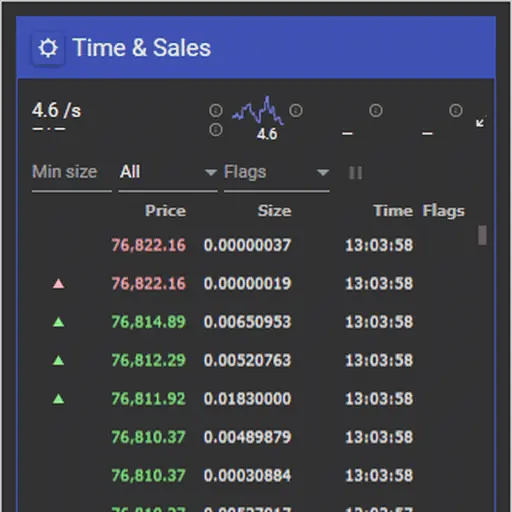
Time & Sales lists each trade print as it arrives: price, size, time, flags, side and venue. Prices are green when the buyer was the aggressor, pink when the seller was, and grey when the feed sent no side.
How It Works: 1. Trade rate: eligible on-book prints per second over the window, 1 to 60 seconds, 10 s by default. Volume rate does the same for traded size. The tile shows the trade rate, and it is the value alert rules can use 2. Large-lot share: the part of eligible volume that came in large lots. A large lot is a print at or above a percentile, 50 to 99, of the venue's recent print sizes, or at or above a fixed size you set. Size does not identify who is trading 3. Level-sweep rate: sweeps per second, where a level sweep is one aggressive order walking two or more price levels on one venue. It is not an intermarket sweep order 4. Header strip: small charts of trade rate, level-sweep rate and large-lot share
Feed class: large-lot share, level-sweep rate and the flag filters need a feed that declares its capability class. No connector declares one in this version, so on live feeds those two values show a dash, and ticking a flag filter hides prints from such feeds. The tape, the trade rate and the volume rate work on every feed.
Filters for minimum size, side, venue and flags change what is displayed only: every metric still counts every print. Pause holds the rows on screen while prints keep arriving and the metrics keep running. The Time column says whether it shows exchange time or arrival time.
With several venues, rows are interleaved in arrival order. That is display order, not a cross-venue sequence. The study does not check that the venues trade the same instrument.