Data, storage, and replay
Record VisualHFT Terminal sessions, verify their stream metadata and finalization, then replay them with controlled routing and timing.
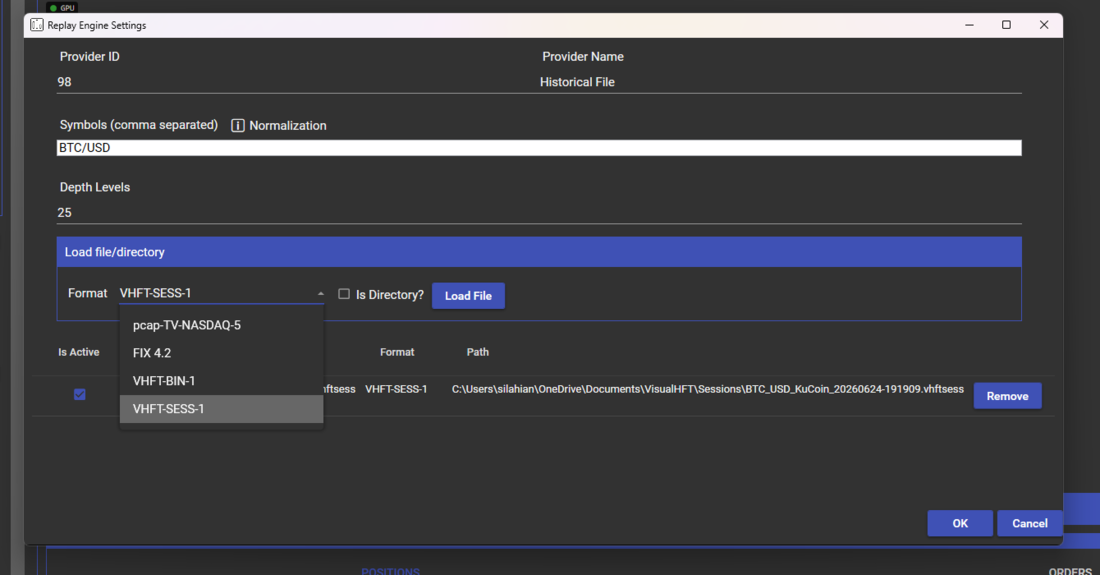
This VisualHFT Terminal Pro workflow uses Session Recorder and Replay Engine. They are not included in the public GitHub source build.
Replay Engine is included with the current Pro plan. Session Recorder is a separately purchased Marketplace add-on. Confirm current plan and add-on availability before relying on either plugin.
Configure a recording
- Start and verify each live connector before opening Session Recorder.
- Add the provider and symbol streams to capture.
- Confirm that every configured provider name resolves to a live provider; unresolved streams are skipped.
- Start the recording and confirm the state changes to Recording.
- Let representative book and trade messages arrive before stopping.
- Stop from the recorder control and wait for the saved-session notification.
The recorder writes a session header with format and metric-schema versions plus a stream table. Stream entries identify provider, symbol, aggregation, and the price/size precision learned for the stream. Preserve a separate experiment note for the question, operator actions, connector build, and any later filtering because those facts are not all part of the capture file.
Confirm finalization
A recording is not complete until Stop drains pending frames and writes the footer. Record the saved path and frame count from the completion notification. A zero-frame or unverified session is evidence of a capture problem, not an empty but valid market sample.
Validate before analysis
Check for missing prices, invalid sizes, crossed books, sequence gaps, duplicates, out-of-order events, timestamp discontinuities, and expected exchange downtime. A file that opens successfully is not automatically a valid market-data sample.
Retention
Session history is stored under %LocalAppData%\VisualHFT\SessionRecorder; mutable application settings and logs use %LocalAppData%\VisualHFT.UserData. Base retention on reproducibility, data licensing, and cost. Keep the session manifest longer than transient screenshots or derived views.
Replay
- Stop or isolate live feeds that could overlap the recorded provider and symbol.
- Open Replay Engine and select a supported session from its catalog or file picker.
- Inspect the recorded time range and stream list before playback.
- Start at normal speed and confirm order book, trades, and provider state on one core surface.
- Increase speed only after the short validation segment behaves as expected.
- Stop replay and confirm that live-routing state is restored before returning to live analysis.
Replay advances VisualHFT’s application clock from recorded events. There is no operator-selectable “fixed clock” mode. Seeking and accelerated playback can change wall-clock pacing, but recorded event time remains the time basis for replay consumers.
New to VisualHFT? Get Started. New accounts get a 7-day trial.