Open-source architecture
Trace the open-source market-data path, plugin lifecycle, study results, triggers, and dependency boundaries.
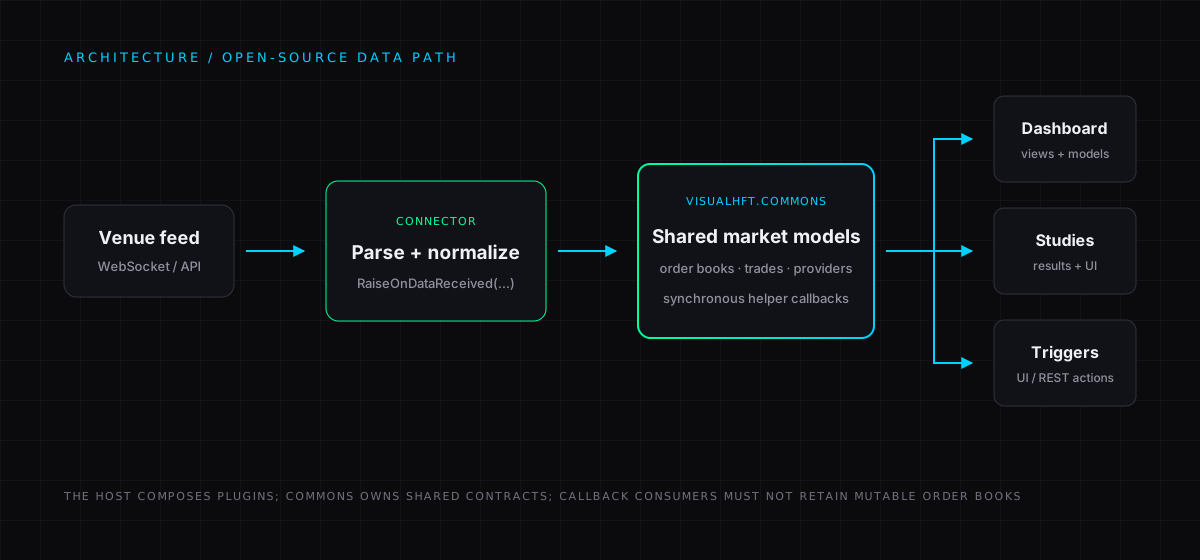
VisualHFT is a Windows desktop application that turns live venue data into a shared market-data view, analytical studies, and configurable trigger actions. This page describes the open-source repository as it runs today.
System at a glance
flowchart LR
    A[Venue feed] --> B[Connector plugin]
    B --> C[Normalised market models]
    C --> D[Shared helpers]
    D --> E[Dashboard view models]
    D --> F[Study plugins]
    F --> G[BaseStudyModel results]
    G --> H[Charts and tiles]
    G --> I[Trigger engine]
    I --> J[Configured UI or REST actions]
Components and dependency boundaries
Desktop host
The VisualHFT project is the WPF application. It starts the application, loads and starts plugins, hosts the dashboard, and owns trigger configuration and the trigger engine.
Shared libraries
VisualHFT.Commons contains the shared market models, helper publishers, plugin contracts, and plugin base classes. It does not depend on WPF.
VisualHFT.Commons.WPF contains reusable WPF support and depends on VisualHFT.Commons. The desktop host can use both libraries.
Plugins
Connector and study assemblies use the shared contracts. A connector derives from BasePluginDataRetriever. A study derives from BasePluginStudy. Built-in plugins are included as project references by the host so their assemblies are copied beside the application for runtime discovery.
Market-data path
A connector receives a venue-specific feed, maps it into VisualHFT’s normalised models, and publishes updates through RaiseOnDataReceived(...). Order books, trades, providers, and symbols are delivered by the corresponding shared helper.
Dashboard view models and study plugins subscribe to the same helpers. The helper callbacks are synchronous. A subscriber must finish quickly and must not retain the mutable OrderBook it receives.
Study results and triggers
Studies decide how to process their input. A short calculation can run in a helper callback. A study that needs to keep an order-book state or do longer work can take an OrderBookSnapshot, queue that work, and dispose the snapshot when it is finished.
BasePluginStudy.AddCalculation(...) sends a BaseStudyModel through the study’s aggregation and result path, then raises OnCalculated. The plugin manager registers single-study results with the trigger engine. The dashboard consumes the same study output for live tiles and charts.
This is deliberately not a claim that every study uses a queue or snapshot. For example, the VPIN study processes its configured trade and order-book callbacks directly, while the Market Resilience study snapshots order books before queued processing.
Plugin discovery and lifecycle
At startup, PluginManager.LoadPlugins() scans the directory containing VisualHFT.exe for DLLs. It creates non-abstract exported types that implement IPlugin, then starts the applicable connector, study, or multi-study lifecycle.
For a source build, add an extension project as a ProjectReference to VisualHFT.csproj. Its output must be copied next to the application executable for the runtime loader to discover it. Discovery loads assemblies in the application process. It is not a process-isolation boundary.
Extending VisualHFT
Start from the public templates:
Source map
- Application startup
- Plugin discovery and lifecycle
- Connector publish contract
- Study result contract
- Order-book callback helper
- Disposable order-book snapshot
For a visual companion, see the interactive architecture map.
New to VisualHFT? Get Started. New accounts get a 7-day trial.